
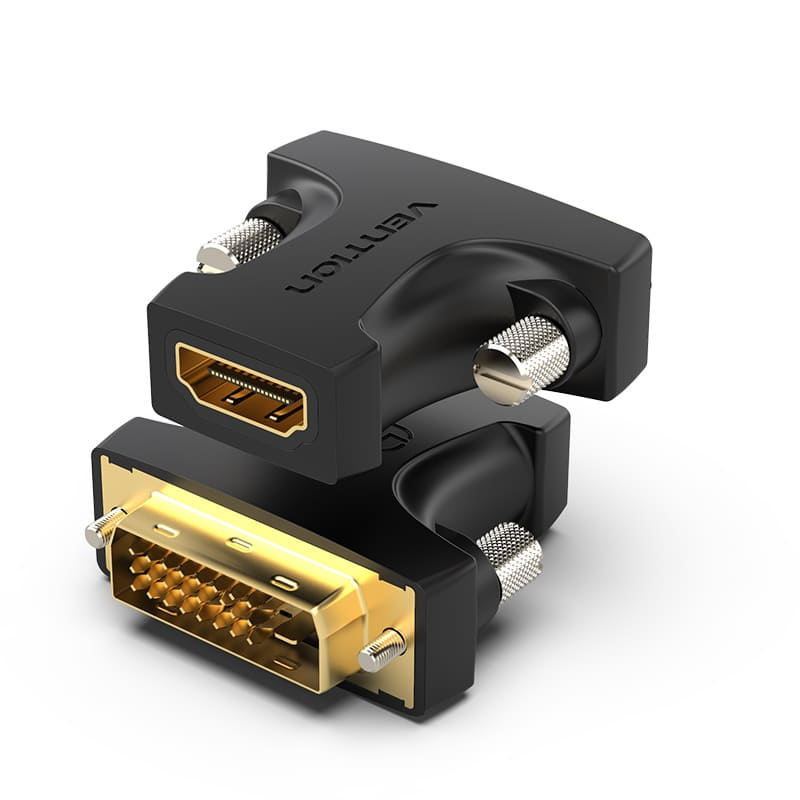

Vention HDMI Female to DVI (24+1) Male Adapter Black (ECDB0) – Connect an Older DVI PC to a New HDMI Screen
The Vention HDMI Female to DVI (24+1) Male Adapter Black (ECDB0) is a passive, bi-directional video adapter with a DVI-D (24+1) dual-link plug on one side and an HDMI socket on the other. Because it plugs directly into a DVI port, an office desktop or graphics card that only has DVI output can connect to a new HDMI monitor, TV or projector using a standard HDMI cable. In addition, it works the other way round, so an HDMI laptop or decoder can drive a DVI-only monitor. It carries digital video up to 1080p, and its gold-plated connectors resist corrosion for a stable picture. As a result, an SME in Industrial Area or a school in Nyeri can replace broken screens with HDMI monitors without replacing the computers. Since DVI does not carry sound, audio needs a separate cable to speakers.
Key Features
In short, this adapter stands out in five areas:
- DVI-D (24+1) male to HDMI female – plugs straight into a PC’s or monitor’s DVI port
- Bi-directional – DVI to HDMI or HDMI to DVI
- Digital video up to 1080p – a sharp picture with no analog conversion
- Gold-plated connectors – resist corrosion and keep the signal stable
- Passive, plug-and-play design – no power or drivers needed
Technical Specifications
Specifically, the table below details every core specification of this adapter:
| Specification | Details |
|---|---|
| Brand | Vention |
| Model | ECDB0 |
| Product Type | DVI to HDMI adapter (passive) |
| Connector A | DVI-D (24+1) dual-link male |
| Connector B | HDMI Type-A female |
| Signal Direction | Bi-directional |
| Maximum Resolution | Up to 1080p |
| Audio | Not supported over DVI; use a separate audio cable |
| Connector Plating | Gold-plated |
| Power | None required (passive) |
| Color | Black |
| Installation | Plug-and-play, no drivers needed |
| Warranty | 12 months |
Who This Is Best Suited For
As a result of this combination of specs, three types of users benefit most:
- Offices and schools with older DVI desktops – connect them to new HDMI monitors or TVs
- PC gamers with DVI graphics cards – use a spare DVI output for an HDMI monitor
- Home users with a DVI-only monitor – connect an HDMI laptop, decoder or TV box
If the old DVI desktop is due for retirement, browse our range of HP Desktops.

Reviews
There are no reviews yet.