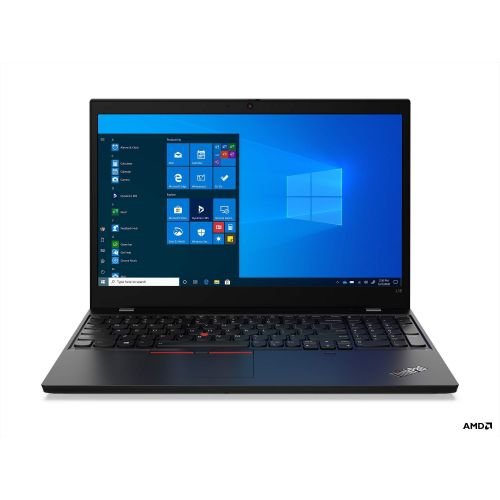


Lenovo ThinkPad L15 Gen 1 – Celeron, 8GB RAM, 256GB SSD
The Lenovo ThinkPad L15 Gen 1 refurbished laptop is a 15-inch business laptop designed for everyday productivity tasks, web browsing, and document work. This entry-level ThinkPad combines reliable build quality with essential computing performance at an accessible price point. Ideal for students managing coursework and assignments, and businesses equipping employees with dependable hardware for office applications and communication tools.
Key Features & Benefits
- ThinkPad Durability Standards: Military-spec tested construction withstands daily commutes and classroom use, providing long-term reliability that reduces replacement costs compared to consumer-grade laptops.
- 8GB RAM for Multitasking: Handles multiple browser tabs, Microsoft Office applications, and video conferencing simultaneously without performance slowdowns during typical workday or study session activities.
- 256GB SSD Storage: Solid-state drive boots Windows in seconds and loads applications quickly, while providing adequate space for documents, presentations, and course materials without mechanical hard drive failure risks.
- 15-Inch Display Size: Larger screen real estate improves productivity for spreadsheet work and side-by-side document comparison, reducing eye strain during extended work sessions compared to smaller ultraportables.
- Full-Sized Keyboard with NumPad: Legendary ThinkPad typing experience includes numeric keypad for data entry tasks, making it practical for accounting students and professionals working with financial applications.
Technical Specifications
Processor & Performance
- CPU: Intel Celeron (specific model varies by configuration)
- Cores/Threads: Dual-core architecture
- Base Clock Speed: Varies by Celeron model (typically 1.8-2.8 GHz)
- Cache: 4MB (typical)
- Performance Tier: Entry-level for basic computing tasks
Memory & Storage
- RAM: 8GB DDR4 (soldered or single DIMM)
- RAM Speed: 2666 MHz
- Maximum RAM: Configuration-dependent (check specific model)
- Storage: 256GB SSD (M.2 NVMe or SATA)
- Storage Type: Solid State Drive
- Expansion: M.2 slot (may support additional storage)
Display
- Screen Size: 15.6 inches
- Resolution: 1920×1080 (Full HD) or 1366×768 (HD) depending on configuration
- Panel Type: TN or IPS (varies by configuration)
- Anti-Glare: Yes
- Brightness: Typically 220-250 nits
Graphics
- GPU: Intel UHD Graphics (integrated)
- Graphics Memory: Shared system memory
- Video Output: HDMI, USB-C (DP Alt Mode on some configs)
Connectivity & Ports
- USB Ports: 2x USB 3.2 Gen 1 Type-A, 1x USB-C 3.2 Gen 1
- Video Output: HDMI 1.4b, USB-C (DisplayPort)
- Audio: 3.5mm combo headphone/microphone jack
- Ethernet: RJ-45 Gigabit Ethernet
- Card Reader: Optional (configuration-dependent)
Wireless Connectivity
- WiFi: 802.11ac (WiFi 5) dual-band
- Bluetooth: 5.0
- Optional: 4G LTE WWAN (specific configurations)
Security Features
- TPM: 2.0 Trusted Platform Module
- Kensington Lock Slot: Yes
- Optional: Fingerprint reader (configuration-dependent)
- BIOS Protection: ThinkShield security suite
Battery & Power
- Battery: 45Wh (typical configuration)
- Battery Life: Up to 8-10 hours (varies by usage)
- Power Adapter: 65W USB-C or traditional barrel plug
- Fast Charging: RapidCharge capable (charges 80% in 60 minutes)
Physical Specifications
- Dimensions: 365mm x 255mm x 22.5mm (approximate)
- Weight: Starting at 1.98 kg (4.37 lbs)
- Chassis Material: Plastic with reinforced structure
- Color: Black
- Keyboard: Full-sized with numeric keypad, spill-resistant
Operating System
- OS: Windows 10 Pro or Windows 11 Pro (depending on purchase date)
- Downgrade Rights: Windows 10 Pro available
Audio & Camera
- Speakers: Stereo speakers (2x 2W)
- Microphone: Dual-array microphone
- Webcam: 720p HD camera
- Privacy Shutter: ThinkShutter physical camera cover
Use Cases & Applications
Student Budget Computing: College and university students can handle essay writing, research papers, online coursework, and virtual lectures without overspending on unnecessary performance. The ThinkPad L15 runs Microsoft Office, Google Workspace, and learning management systems smoothly at a fraction of higher-spec laptop costs.
Office Administration Tasks: Administrative assistants and office coordinators can manage email communication, calendar scheduling, document preparation, and data entry efficiently. The numeric keypad accelerates invoice processing and spreadsheet work compared to laptops without dedicated number keys.
Remote Work Setups: Employees working from home can participate in video conferences, access cloud applications, and complete documentation tasks reliably. The 15-inch screen reduces the need for external monitors in temporary or flexible workspace arrangements.
Small Business Operations: Startups and small businesses can equip teams with professional-grade hardware without enterprise-level budgets. The ThinkPad durability means lower failure rates and reduced IT support costs compared to consumer laptops in business environments.
Library & Public Computer Replacements: Educational institutions can deploy these laptops in study areas or lending programs knowing they’ll withstand heavy multi-user environments. The military-spec testing provides confidence in long-term institutional use.
Non-Profit Organizations: Charities and community organizations with limited technology budgets can provide staff with capable computers for grant writing, donor management, and program coordination. The balance of affordability and reliability suits organizations prioritizing mission over equipment spending.
Field Service Documentation: Technicians and inspectors can document work orders, update service records, and access manuals on-site. The larger screen improves readability in various lighting conditions compared to tablets, while the durable build handles transport between job sites.
Classroom Computer Labs: Schools can outfit computer labs with standardized hardware for teaching basic computing skills, typing classes, and standardized testing. The consistent ThinkPad keyboard layout across models simplifies student transitions between machines.
Performance Expectations: The Celeron processor handles web browsing, document editing, email, and video streaming effectively but is not designed for demanding tasks. This laptop works well for single applications or light multitasking—running multiple heavy programs simultaneously may cause slowdowns. Video editing, 3D rendering, gaming, and software development require higher-spec processors.
The 8GB RAM adequately supports Windows 11 and typical office applications but may limit performance when running multiple memory-intensive programs. Consider closing unused browser tabs and applications to maintain smooth operation. The 256GB SSD provides fast performance but limited storage—users with large media libraries should utilize cloud storage or external drives.
Who This Laptop Is NOT For: Content creators requiring video editing or graphic design capabilities should consider models with dedicated graphics cards and faster processors. Gamers need higher-performance hardware with discrete GPUs. Software developers running virtual machines or compiling large codebases benefit from more RAM and faster CPUs. Engineering students using CAD software or data scientists running analysis workloads require workstation-class specifications.
Upgrade & Expansion Considerations: Some configurations allow RAM upgrades if not soldered—check your specific model before purchasing additional memory. The SSD may be replaceable or upgradable depending on configuration, allowing future storage expansion. However, the Celeron processor cannot be upgraded, so ensure this performance level meets your needs before purchase.
ThinkPad Advantage: Despite entry-level specifications, this laptop inherits ThinkPad’s legendary keyboard, trackpoint navigation, and durability standards. The business-focused design includes practical features like spill-resistant keyboards, reinforced hinges, and superior build quality compared to similarly-priced consumer laptops. This makes the ThinkPad L15 Gen 1 an excellent choice when reliability and typing comfort matter more than raw performance specifications.


Reviews
There are no reviews yet.